


SMLogging
component suite 1.70
extended
debug tool which is integrated in your application!
|
|
SMLogging
component suite 1.70 |
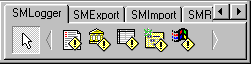
SMLogging suite 1.70 is a component set for logging of errors/exceptions, tracing of messages, events etc
SMLogging is a native VCL engine with multi-language support.
| Download (last updated: September 16, 2025) |
| HTTP | FTP | ||
| RAD Studio 13 Athens | 1.7Mb | smlog170d13.zip | smlog170d13.zip |
| RAD Studio 12 Athens | 0.3Mb | smlog170d12.zip | smlog170d12.zip |
| RAD Studio 11 Alexandria | 0.3Mb | smlog170d11.zip | smlog170d11.zip |
| RAD Studio 10 Seattle/10.1 Berlin/10.2 Tokyo/10.3 Rio/10.4 Sydney | 1.3Mb | smlog170rx10.zip | smlog170rx10.zip |
| RAD Studio XE7/XE8 | 510Kb | smlog170xe78.zip | smlog170xe78.zip |
| RAD Studio XE6 | 270Kb | smlog170xe6.zip | smlog170xe6.zip |
| RAD Studio XE5 | 270Kb | smlog170xe5.zip | smlog170xe5.zip |
| RAD Studio XE4 | 280Kb | smlog170xe4.zip | smlog170xe4.zip |
| RAD Studio XE3 | 300Kb | smlog170xe3.zip | smlog170xe3.zip |
| RAD Studio XE2 | 300Kb | smlog170xe2.zip | smlog170xe2.zip |
| RAD Studio XE | 260Kb | smlog170xe.zip | smlog170xe.zip |
| Delphi 2009 trial packages | 200Kb | smlog170d2009.zip | smlog170d2009.zip |
| BDS2006 (Delphi and C++Builder) and Delphi 2007 trial packages | 400Kb | smlog150bds.zip | smlog150bds.zip |
| Delphi 2005 trial package | 170Kb | sml150d2005.zip | sml150d2005.zip |
| Delphi 3-7, C++Builder 3-6, demos | 1.1Mb | smlog.zip | smlog.zip |
| Compiled demo applications | 650Kb | smlogdemo.zip | smlogdemo.zip |
| C++Builder 3 trial package | 200Kb | smlog_c3.zip | smlog_c3.zip |
| C++Builder 5 trial package | 200Kb | smlog_c5.zip | smlog_c5.zip |
| C++Builder 6 trial package | 500Kb | smlog_c6.zip | smlog_c6.zip |
| Freeware tds2map tool (for C++Builder users) | 70Kb | tds2map.zip | tds2map.zip |
You may use the
shareware trial version for 30 days with Delphi IDE running only.
If after 30 days you would like to continue using it, then you
should purchase a license.
| Price |
| License fee is | |
| full suite with sources | 19.95 EUR |
* you can distribute the own applications
absolutely free without any additional hidden fees
** one license allow to work with this component suite on one
computer only (one developer). You need as many licenses as many
developers will use these components
.*** the site license allow to use these components in company
with unlimited number of developers. The license fee is
5*(developer's fee)
| Order |
Products can be ordered online over the Internet using VISA, MasterCard or American Express credit card, Toll Free Phone, 24 Hour Fax, or Postal Mail at following sites:
| Registrators | ||
| PayProGlobal |  |
Buy it! |
| Benefits |
| Install instructions |
1) Unzip it to a created folder
2) Run Delphi or C++Builder
3) Select Install packages... item in Component
menu
4) Press Add button and select a package file (SMLog.DPL
for D3, SMLog.BPL for D4/5/6/7/2005/2006/2007/2009/2010/XE/XE2/XE3 and CB3/4/5/6) in
installed directory
5) Press Ok button
6) Enjoy it. In palette on SMLogger page you can
find a installed new components
| Activate methods |
You must define a LogFile property and set the
Active property to True.
Also you can control a logging in extended events. Default format
of logging text you can customize in Formats property.
To save a custom messages:
1. you can customize a saved text in extended events
2. you can save the own text without standard text thru
procedures:
- WriteAsString: write a string into log
- WriteAsInteger: write the integerinto log
- WriteAsFloat: write a float value into log
- WriteAsDateTime: write a date/time into log
| Translated resources |
In archive which will receive the registered user in SOURCES\RESOURCES you can find the translated resources for these languages:
| Language | Translator | |
  |
English | Mike Shkolnik |
 |
German | Gerhard Schmidt-Adomeit |
 |
Dutch | Wouter Ballet |
 |
Portuguese (Brazil) | LUCIO F FEITOZA |
 |
Russian | Mike Shkolnik |
 |
Ukrainian | Mike Shkolnik |
| Screenshots |
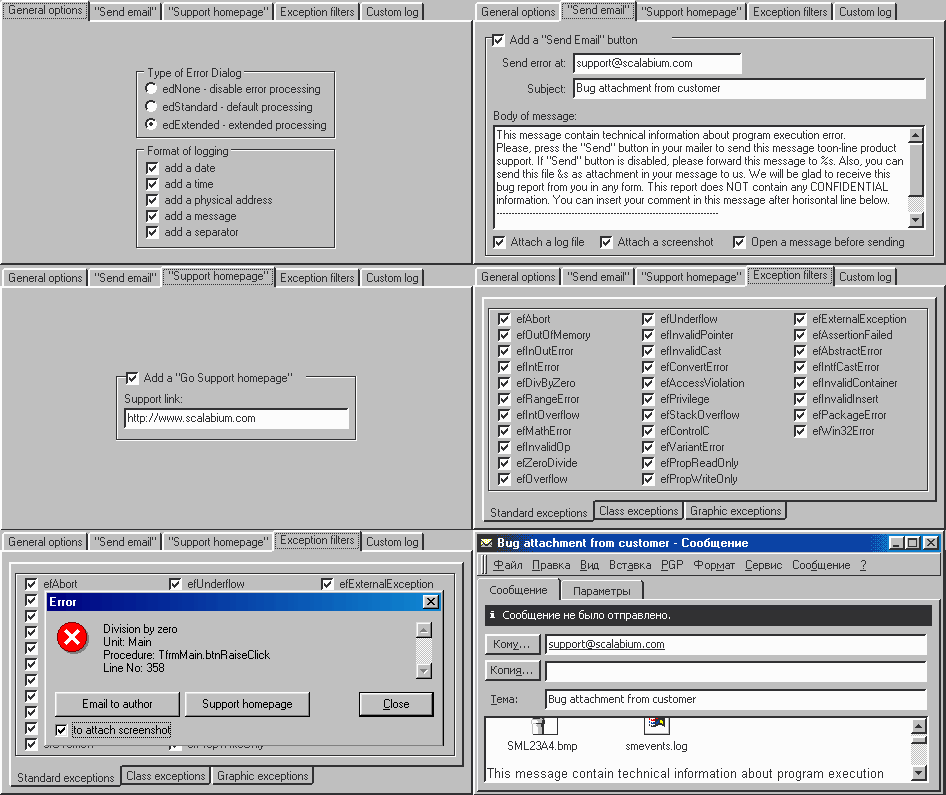
Try SMLogging suite 1.70 before you buy it.
|
 |
Copyrightc 1998-2026, Scalabium
Software. All rights reserved. |